Follow the coloured cells.
Enter your opening cash, salary and payday in Get Started. Navigation links point you to the next step.
A MONEY SYSTEM BY SAHICALC
Salary in. Bills coming. Plans waiting.
Know what’s actually left to spend.
Turn your next payday into a clear plan for bills, savings and everyday spending. A guided Excel system you own—not another subscription to remember.
Excel workbook + filled-in example + 16-page illustrated guide.
Best on desktop Excel. Manual entry. No macros or bank connection.
YOUR PAYDAY SNAPSHOT
₹67,003.00
Opening cash + income, less spending, transfers & reserves
Illustration of the system. Actual workbook previews below.
4 everyday sheets
2 optional deeper views
1 complete illustrated guide
0 subscription fees
YOUR FIRST PAYDAY, MADE SIMPLER
Explore the filled-in example first.
Then make the clean copy your own.
Enter your opening cash, salary and payday in Get Started. Navigation links point you to the next step.
Plan bills and savings. Record what actually comes in and goes out in one filterable Money Log.
Use the Dashboard to check spending room, budget progress and your cash balance. Adjust when life changes.
Goals, debts and annual reviews are there when you need them. No need to fill every tracker on day one.
Some of that money already has a job. Change these example numbers and see what’s left.
Your demo entries stay in this page. We don’t save or send them.
Not the whole ₹75,000. That’s the difference a plan makes.
Simplified example: starts with ₹0 opening cash and covers one payday. The workbook also carries cash forward, tracks dated bills and transfers, and keeps your monthly history. This is an estimate, not a spending guarantee.
Turn this into your monthly routine ↗SOUND LIKE YOUR MONTH?
Less scattered tracking.
A routine you can come back to.
“Where did my salary go?”
Compare your spending plan with actual entries, so the small expenses have a place too.
“That annual bill? Again?”
Keep insurance, festivals, travel and bigger purchases in dedicated sinking funds.
“Can I actually spend this?”
See an estimate after recorded spending, transfers, unpaid bills and remaining allocations.
SEE IT BEFORE YOU BUY IT
These are actual workbook previews.
All numbers are fictional example data.
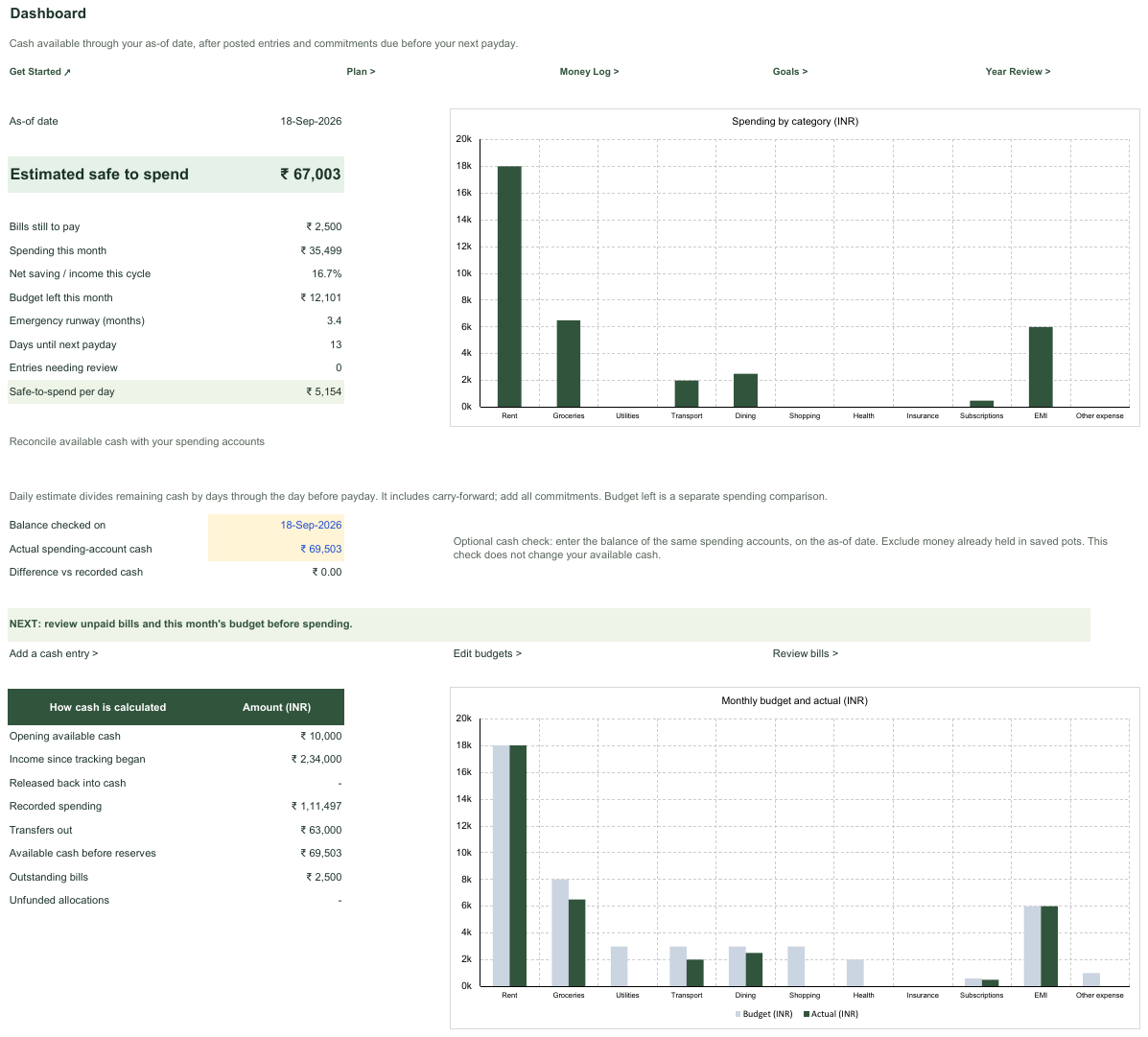
See estimated spending room, budget left and a daily estimate. Check recorded cash against your spending account before deciding.
Your entries drive the calculations. Always reconcile with your account.
Make this your routineTHE PAYDAY WORKFLOW
A simple order for the decisions
you make every payday.
Record what actually moved. The workbook updates what still needs funding.
SMALL ROUTINE. BIGGER PICTURE.
Start with your next payday.
Grow into the other trackers at your pace.
Know what comes in. Decide what goes out.
Give every rupee a job before it disappears.
Make space for the things you are working for.
Step back and see more than this month.
YOUR COMPLETE DOWNLOAD
Four everyday sheets and two optional deeper views. Coloured input cells, navigation links, protected formulas and charts that update with your entries. No macros.
Three fictional months to explore before you enter your own figures.
16 illustrated pages covering setup, a worked example, everyday use, cash checks, Sheets import, troubleshooting and safe migration.
Template fixes and improvements. Keep your downloaded version, with no renewal.
IS THIS YOUR KIND OF SYSTEM?
You want a repeatable payday routine.
You are comfortable entering spending yourself.
You prefer a file in Excel or your own Google Drive.
Need automatic bank sync or personalised financial advice? Those are not part of this product.
YOUR NEXT PAYDAY STARTS HERE
One purchase.
A system for the months ahead.
Launch price until 1 Nov 2026, 11:59 pm IST. New offer checkouts close 16 minutes before the deadline.
Your financial entries stay in your file.
No SahiCalc login. No bank connection.
GOOD QUESTIONS. CLEAR ANSWERS.
A little clarity before your first payday with Salary Money OS.
A digital download containing a clean Excel workbook, a separate workbook with three months of fictional example data, and one complete illustrated PDF guide covering setup, daily use, Google Sheets import and V1 migration. This release does not include a video or a separate native Google Sheets template.
No. You pay once and keep your downloaded version. Any template fixes and improvements released within one year of purchase are included, with no automatic renewal or promised release schedule. The current price and offer deadline are shown above.
Use a current desktop version of Microsoft Excel for the intended experience; Excel is not included. The guide also explains how to import a copy into your own Google Sheets. V2.2 has been checked in desktop Excel, but this release has not been verified in native Google Sheets. Charts, formatting, filters and formula protection may differ after import. A phone is not recommended for setting up or managing the workbook.
The fictional example shows how salary, bills, savings and goals fit together. Start with Get Started, Money Log, Monthly Plan and Dashboard. The other two sheets are optional; the complete guide walks you through each step. You enter your transactions manually; there is no automatic bank sync.
No. SahiCalc receives purchase details, not your workbook entries. The Excel file stays wherever you save it. If you use Google Sheets or cloud sync, that provider stores your file. No bank login is required.
It starts with opening available cash and posted income, subtracts spending and transfers, and reserves unpaid commitments due before next payday. It carries unspent cash forward and excludes future salary and existing saved pots. A negative amount flags a shortfall. Keep your entries complete and reconcile the estimate with your spending account.
Each workbook has 2,000 cash-entry rows, 144 dated category budgets, 240 commitments and 20 shared goal or sinking-fund pots. Start a fresh copy for a new year and keep your previous files for reference.
After your payment is verified, we email a download link to the address you enter at checkout. The link lasts 72 hours and allows five download attempts. If it expires, use the download-help page to request a new link with your purchase email.
Email admin@sahicalc.com. The product terms explain support and refund handling for technical problems, duplicate purchases and other eligible cases. Your statutory rights remain unaffected.
MAKE YOUR NEXT PAYDAY FEEL DIFFERENT
One-time purchase. Your own copy. A clearer routine.
Salary Money OS is an educational budgeting tool, not investment, tax, legal or personalised financial advice. Calculations depend on complete, accurate entries. Google Sheets requires importing the Excel workbook; formatting, charts and protection can differ.
Planning your income? Try our free in-hand salary calculator and EMI calculator.